The bygone much-derided Software Craftsmanship debate brought forward and addressed some of the same topics we now see bubble up from the large democratisation of software construction as more – previously only casually acquainted – people are introduced to the challenges of building software.
If you recall, the software craftsmanship was about telling developers to stop acting like labourers and start acting like professionals. I.e. instead of blaming tools, managers or customers, they would start taking responsibility for the quality of the software product. Not offering to introduce poor constructs as a way of achieving short term time savings, when as a supposed professional you know what the risks are. There were proposals of self-regulating the industry, introducing something akin to a bar association and licensing, so that you had a professional license you were risking if you turned a blind eye to data security or similar. The thesis was, if we do not do it ourselves, it will be imposed upon us by governmental regulation as soon as the loss of life becomes too egregious.
The reason for concern at the time of the Software Craftsmanship debate was the exponential growth of the programmer workforce, with a majority of active software developers having less than three years experience, combined with the way software was permeating all aspects of life, getting into cars, fridges and toasters et c.
Software bugs took the first lives back in the mid 1980s, and with people vibe coding apps or running AI agents without enough experience, we will see drastic increases in cost, hopefully only economical.
I myself likened it to plumbers and electricians having certifications within the trades, where they could risk exclusion if they did not adhere to agreed standards.
If the explosive growth of the programming professions were a problem in the mid 2010s, what do we think is happening now?
I liken the new sets of AI tools to the proliferation of power tools that are available to the general public. It does not have to be a disaster to do your own plumbing or electricity in your house, but if you ask any plumber or electrician they seem to have a kaleidoscope of experience of DIY installations they have encountered that were interesting / dangerous.
There is a reason why the council might send a man round to see what you are up to when undertaking construction on your house.
The point of this is not to broadly accuse people of being the software equivalent of a cowboy builder, the point is – I think the software developers that will keep their jobs going forwards are the ones that abandon the role of labourer and at minimum become a foreman over their AI agents. Occasionally lift your gaze above the line-by-line and examine architecture, question the overall structure of what is being built. Along with ensuring that the code remains sound, we additionally need more eyes on the bigger picture. If you have an organisation above you that make strategic decisions about software architecture, ask good questions, bring contrary opinions – maybe your observations are correct, maybe they are not – but the discussion is healthy. Blindly typing some code because the boss says so, that job will be done faster and cheaper by an AI agent.
Recently there have been multiple very serious supply chain exploits that have yet to cease causing problems. Security folks laugh and say “least privilege”, “patch hygiene” and shrug at us mere mortals just trying to go about our days in peace.
They are of course right, us normals are way too comfortable downloading random libraries from the internet, some smaller firms do not have the manpower to manually vet every patch before they are applied, but best case pick a slower update ring to have a chance that others discover problems before they get to them.
In some less competent organisations, security is retrofitted – i.e. every environment is locked down with no regard to working processes, meaning productivity grinds to zero.
Just like you can’t apply marinade after the fact, security – and quality – must be built in from the beginning. Everybody knows that – if you can believe it – but it is very hard to find concrete guidance on the public internet on what to do as a developer. This isn’t it either, by the way. If you were hoping for the professional developer’s guide to hardened development environments, this is definitely not it. I’m just some guy on the internet. At work I have highly qualified coworkers that help me whose secrets I cannot spill.
However, I will try to explain what is going on, and give some basic suggestions that improve your security if you are literally at zero right now.
I will only focus on things that are relevant to a developer machine, so things like OAuth hygiene (not allowing random apps access to your apps or your infrastructure) or what exactly secure code looks like are out of scope here.
I keep this stuff vague for the sake of broader applicability, but hopefully the terms I use are easy enough to google for your platform / stack.
What is happening?
A supply chain attack means that instead of bothering with attacking a company directly, the tools that companies use are attacked and have critical data stolen. Once the data looks relevant (crypto wallet keys, AWS keys, OpenAI credentials, signing keys for popular open source libraries et c) they either sell the information off to other criminals, or go on and attack further organisations. This means we have no idea what the total blast radius will become from an attack that first happened in February. Sometimes data hangs around even longer before further exploits can happen.
Far too many attacks are exploiting system administrators and developers. Sadly AI have made these exploits far easier. Even if the user has properly locked down credentials, the malware can still do everything you can do, so you can get a malware to calmly enumerate all of your secrets, your session configuration files, anything in the filesystem you can read that looks like a relevant password or key and upload it. It didn’t hack anything, you just ran a program that did what programs do, and it could still be enough to bring down a whole company. Once on the computer it can sometimes tell the operating system to load malware as part of the process of starting other programs, and transparently investigate any programs you run on your computer to see what other things you offer up.
What is happening? Well, many things, but one avenue of attack is adding code that runs as soon as a python library is imported. If you ask cursor to solve a problem, it will create a requirements.txt file and if you just import it and aren’t aware of specific versions, you can be owned right there. Other package managers of various forms have similar initialisation code that can be exploited. For operating system packages you need to elevate before it gets to do anything, but today’s bad guys do not need elevated privileges, they do harm with your information alone.
But I am using a Mac, that means it’s secure, right?
Yes and no. The security culture on a Mac is far better than it has historically been on Windows. You have to elevate to do administrative things, the normal user has limited access to make system wide attacks, it’s harder to cryptolock your computer than an old Windows computer on a dodgy network.
But the problem with the latest attacks is that they do not ransom you directly, they just silently steal thing things you may rely on in your daily work.
Also, olden day security culture meant things like having a “secure” folder called ~/.ssh where you kept keys that let you remote access into other computers or push commits to GitHub. It’s chmod:ed 600, meaning only you – but unfortunately also any malware that runs under your account – can read or write it. This was considered secure when the big threat was your colleagues logged in to the same machine would steal your credentials by accessing the files directly. Today the threat is using your credentials, so anything you can read, the bad guy can read.
The benefit of a UNIX-like environment is that it is relatively easy to create a separate user account that can keep any elevated credentials, meaning you can ensure that your daily driver OS user has nothing seriously dangerous on it that can get stolen whilst browsing the internet. The recommendation is the same on Windows, but it is a lot more cumbersome to use.
What to do then?
Basically, you cannot have anything written down on your account that is sensitive. Unfortunately, we need to get work done, and just like it is unhelpful to yell at people for downloading attachments from email and clicking on them, when their literal job is to download attachments from email and clicking on them, we need to figure out other ways of working.
What about a VM? Sure – if you have the compute horsepower or the money, a developer virtual machine that has no credentials at all on it is helpful. Use command line tools that let you log in via a browser to get temporary credentials when pushing code.
Another option is using dev containers. At some point you will need to give credentials to pull or push code to some remote git repository, and you can write scripts that use docker exec to pass single use credentials into the container for that specific execution. If you need access to cloud resources, either proxy via another container running on your computer or command line tools that temporarily give you specific rights. What is the easiest is up to you. Devcontainers are natively supported by VS Code and Cursor, so a lot of the faff is hidden.
To avoid CI tools automatically upgrading your libraries on the server when you build, you can pin versions of your dependencies and commit those version specifications to the repository. Combine that with some tool like snyk, dependabot and npm audit or similar tools to make sure you get a heads-up when vulnerable versions are out there, you can make conscious decisions to upgrade rather than automatically get pwn3d by a nightly build that accidentally pulled down an exploited 3rd party dependency.
There are local secrets managers you can run rather than have your app read configuration files locally. Even if you use Microsoft’s user secrets for local dotnet development, the secrets are still user readable – obviously – so you are vulnerable to those secrets being read anyway. You would think that cool hacker types would be unaware of how .NET programmers store their secrets on developer machines, but in the day of AI, they will not have to know, they will be told by the AI.
What about when your CI authenticates with *aaS providers or external artefact repositories? General advice is – use short-lived keys that aren’t persisted anywhere, i.e. use OAuth to grant access where possible. When the apps you grant access to are exploited – as some have been in the recent spate of attacks – they will have access to do what its token allowed the app to do when you granted access, so make sure to use whatever tooling helps you reduce scope on the access you give. Yes, the cool security types are right about least privilege as well. On the positive side – tooling has improved so the faff is less overpoweringly tedious. AWS for instance are very good about documenting the least access you need to give when creating IAM roles, which is very useful.
Conclusion
No SSH keys on your machine, don’t casually keep static root cloud credentials around on your computer. The passwords in your cloud based password manager can get stolen either in your browser or via direct attack leveraging an insecure development environment (*cough* *cough* LastPass, Bitwarden), so use tooling to assume roles with temporary credentials whenever you need to do something cloudy.
If you do adminy things that need extraordinary powers, feel free to do so from a separate user account, as there is no need for superpowers whilst browsing programmer blogs. On Linux and Mac that is so easy to set up and use.
Your computer will be exploited. Make sure there is nothing on it that can destroy your life or your livelihood when it gets on the internet. It’s a little bit like the old adage about email, “email like you will one day read it out in a court of law”.
Time’s Arrow. Energy can only change phase in one direction without needing physical work. I.e a cup of coffee cools down when left in room temperature. You will need to actually heat it up, perform work, for the cup to be hotter. A tidy room left alone will get messy until you apply work to organise it, et cetera.
I think we see the same thing happening more broadly in society. Like the iPhone killing the luxury phone market. Perhaps you do not recall it, but there briefly existed niche providers selling phones and laptops covered in gold and diamonds, aimed at the Gucci customer base to ostentatiously signal wealth, but that market is dead, and the flashiest you can get is an iPhone Pro Max Mega Ultra or whatever the latest is – which are far cheaper than those old blinged-out flip phones were.
Music was immensely valuable back in the day, and of course – a proper experience like being in the room with a chamber orchestra is pretty full on, no CD or MP3 can ever compete. Even the much less refined form of music, getting a couple of lads in a room and attempting to play an old song at roughly the same time is an incredibly rewarding experience.
Now people stream all kinds of music with ease. You start getting things like “functional” music for concentration, workouts or relaxation. Music that people don’t really care about, it’s like morning TV was, just a bit of pleasant noise in the background that fulfils a specific purpose.
Just like with the iPhone 1 – it being “good enough” for a lot of people, destroyed an entire market – I think this is what is happening with music, video, and software with the advent of AI.
Why get a tool for something when you can just tell Cursor to sort you out? It’ll push back and argue cost of maintenance versus a more high-level script, but it’ll write things for you. Python, Rust or something else? You decide. Whatever you say, the sycophantic AI will tell you it was a brilliant choice. If you have a well defined problem space and clear acceptance criteria, you can create code you only have passive knowledge of – i.e. can read and understand, but not a solid awareness of how to construct idiomatic code in it – without the perhaps hundreds of hours of googling for documentation you used to have to go through. For a singular problem ( e.g. “I need to test a development website for 123 specific scenarios listed in an excel file…”) it makes perfect sense, and after you’ve validated your results, you can keep the evidence and throw the code away.
Entropy.
Things devalue as tooling becomes more competent. Like people don’t need to know how to adjust carburettors anymore just to own a car.
The lowest bar gets higher, but also the highest bar gets lower.
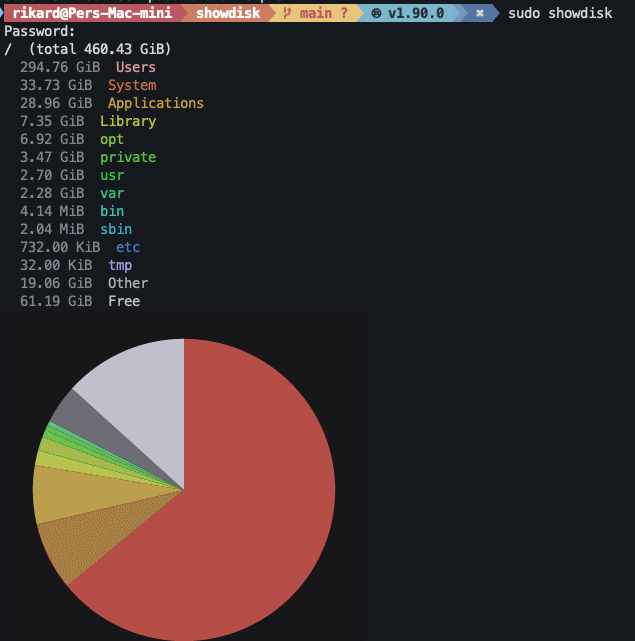
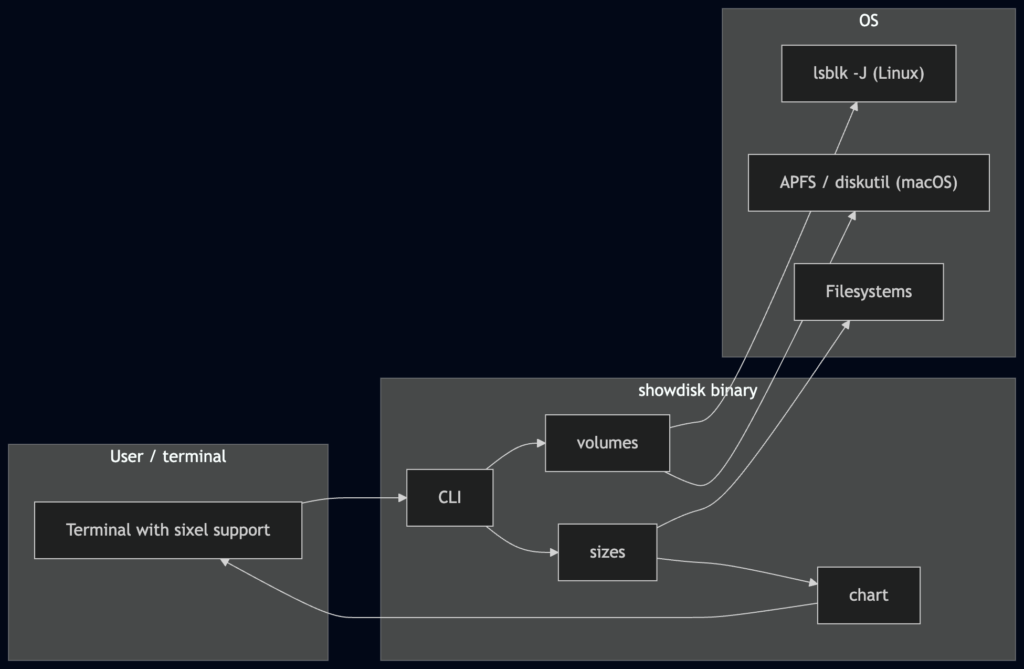
Picture the scene: you are getting warnings by your OS that you are running out of disk space, but you can’t understand the output of du well enough to take action. You miss the old school tooling on windows where you would see a pie chart, where you knew you would have to attach that biggest pie. Also, after I discovered the concept of sixel for graphs in a terminal, I was convinced that I deserve to have both the terminal and a pie chart.
So, like the hypocrite I am, rather than investigating tools like GNU’s faster du tools to see what already exists out there, I had cursor build me the tool I needed.
I am going to armchair quarterback the future of Windows. I have absolutely no insight into what Microsoft are doing, and no deeper knowledge into the internals of Windows than having read the odd Windows Internals book ages ago, as well as following some Microsoft adventures, such as the super deprived windows images they tried to introduce as docker base images for people to use.
What is wrong with Windows you say? Apart from the new ream of bugs, the ads, the telemetry, the copilot integration, the constant UI changes that still don’t solve the fundamental problems?
Well – I think the kernel architecture of Windows is sound. It’s designed by the guy behind VMS, it is very flexible. Things like WSL1 was possible due to the pluggable architecture, I think it may have a performance drawback compared to less heavily abstracted systems, but OTOH, it does have its benefits in the situation we are.
I think NTFS is sound in terms of what it does, it supports journaling, it has granular security, it’s arguably better than EXT4 in certain ways – except it really struggles with small files and big directories. The main problem with NTFS is that rumours say it is so legacy now within the company that developers always try to create new filesystems rather than work on NTFS. I think where modern AI tools actually shine is the way it allows you to wrestle legacy code under control, refactor and make the code maintainable for new developers. If the future of computing in general – and not just in Linux – is inevitably moving towards big folders with small files, a change has to be made, or Microsoft could choose to natively support EXT4 or ZFS.
The big problem Windows needs to solve is the terrible Windows API, as in the GDI bitmap nonsense and the Windows message stacks.
They have tried so many times to make XAML a thing, and I guess I haven’t given up about that, I mean it is fairly close to MacOS X+/NeXT’s interfacebuilder, which clearly works despite being awful to use. Just make compile into something closer to the metal instead of having it managed. Also, don’t drag OLE2 out of the mausoleum for this like you did with Windows 8, just have an app model that starts a process with main() and then hooks into the UI stack. Sure, sandbox the apps as the operating system now has a bunch of built-in security concepts that didn’t exist in DOS that is the foundation for the current Windows API stack, but use some sane method that is compatible with how processes should work in a operating system not from 1980.
Basically we need to leave device contexts handles behind and get onto canvases. I don’t know what a good UI stack should look like, but fundamentally – security – i.e. multi user access and remote control- as a first class design concern, vector graphics, hardware acceleration and effective use of modern processors need to be high on the list of demands. Surely, starting from scratch would allow you to better handle things like clipboards securely.
So – breaking compatibility I say? Yes – and no. I think Microsoft should create a new subsystem for running apps on a completely separate UI stack, with security and performance as the key metrics during design. If you insist on compatibility, let the XAML used for the new stack to be mostly compatible with whatever XAML dialect that has the biggest number of running apps, and find a way to run old apps in a GDI32 emulator in the new desktop. Performance penalty? Yes, allow it. The new UI paradigm is the future, but if people choose to install the legacy subsystem, their old apps will still run. Security features and a well defined upgrade path through microsoft’s developer tooling should allow Enterprise IT departments to force the software estates towards only relying on the new stack.
They should use their enormous network of influencers – MVPs and RDs – to bully people into upgrading their apps to native 64 bit new UI stack like Apple have done multiple times (MacOs legacy => MacOS X+, Motorola 68000 to PowerPC, PowerPC to Intel, Intel to Apple Silicon).
It will end the previously endless cycle of Microsoft attempting to shoehorn a new UI into old windows, and will firmly hang a Sword of Damocles over all legacy windows apps allowing a clear sustainable path to the future.
If the technical design is clean enough, it will be possible to convert desktop virtualisation giants to the new stack early on to get a strong market share, letting you only be dependent on individual app developers to keep up, and given the Office Suite is such a key player, binning the legacy UI and moving to the new stack for themselves among to will directly benefit adoption.
You will have seen property magnates strangle the property market by building data centres on spec (often poorly as the demands of a data centre are quite different than those of an office building or a warehouse), you will have seen the future production for years of memory chips, storage chips and graphics processor already being bought by AI giants, effectively barring the average gaming enthusiast from upgrading their computers or getting into the hobby at all. Apple only being exempt because they too have bought their future capacity for a few years ahead, but at some point when these contracts renew or when China invades Taiwan, the lost capacity at TSMC will hit MacBook and iPhone prices as well. Same thing with gaming consoles, cars and the crippled computers handed out in bulk to the regular corporate drone.
For what, you may ask? For AI memes? For desinformation? For hallucinated information in corporate reports that steer companies in the wrong direction?
In defence of “artificial intelligence”
If you have read AI slop it seems baffling that anyone would like to use it. Especially someone that writes things for a living, yet we see newspaper articles and web pages that contain “If you want I can rewrite this is a more enticing style…” stuff from Chat GPT that they forgot to remove. I.e. people that get paid to write use AI to generate text. Some musicians use Suno to make backing tracks to practice alongside. Why? Is this not like turkeys voting for Christmas?
Not all writing is a Hemingwayeque six month stay in Key West, sometimes you just need to correctly structure text based on 15 news bulletins you got from Bloomberg so that you eventually get paid at the end of the month. Giving an AI a model some rules about writing a news push article (first paragraph that states when, what and who, and then progressively add details in descending order of importance so that the text can be liberally cut from the end if necessary – as an example) and have it produced in seconds. Or in the musician case, rather than getting four mates in a room at the same time just so that you can bore them with practicing soloing in a particular mode, you can have the AI produce a 20 minute fake track with the right chords and not drive anyone insane except yourself.
With software construction it is even more attractive. All the code we write is supposed to not be creative. It is supposed to be familiar, predictable and in keeping with the style of all the rest of the code in the codebase. I.e. the repetition and theft is a feature.
The biggest problem in software development is that we are mere humans with human failings. e.g., some business rules change somewhere, we change the code, observe – hopefully using automated tests – that the change works and then we are onto the next, because we fail to notice that the function name no longer describes what the code does, or even more commonly, an old comment now has become a complete lie.
We had already solved some of these problems with automated refactoring tools that interpret the code to follow the call chain, so that you can rename a function, and it renames every instance of it being used in the code base, thus significantly lowering the threshold for keeping names relevant after code changes. There are also tools that let you automatically extract a piece of code out of a bigger function to reduce the size of functions. From our perspective, as not a vibe coder, AI tools are just an extension of that. I can now ask a developer tool to refactor the existing code into a certain pattern, and although a year ago that could have meant catastrophic corruption of the code, we had things like source control (effectively save points for programmers, you just turn time back to before the boss battle) compilers/linters and tests that limited how crazy things could get, it was still way too interesting. Recently the tools actually produce sane code if you prompt it correctly, even if we still obviously have the guardrails in place.
The irony is that the code we have trained the model is written by mortal humans, and the text you get back from the models sounds like talking to a very junior developer. “All tests run except […] that aren’t important” or “There is one broken test that is unrelated to our change” which is highly amusing. It will also easily disable authentication if it becomes too “difficult” to deal with, which is super dangerous. Guardrails, rules and commands are very important, but at the end of the day you are responsible for the code your model produces.
Risks
I mentioned companies making decisions on hallucinated data before. That is a risk, but on the other hand – how long is the list of companies that went bankrupt because some clever soul accidentally replaced one formula in A Critical Excel Worksheet with the same value as a constant? Every tool is dangerous if used incorrectly.
Of course, completely vibe coded applications that have not been analysed from a security perspective can have an unlimited array of vulnerabilities, it is fundamentally up to the tool makers to protect their users, which seems to be lacking for certain tools. Giving an AI agent full access to your own account and terminal, or your own email is of course very dangerous.
The Tesla Full Self Driving fallacy can happen with agents as well – you give an AI agent an administrative task that saves you a week of gruelling boring mundane work and everything is fine, so you just add more rights until there is a disaster, the same way that Tesla drivers after a few successful uncomplicated drives on the motorway start napping behind the wheel until they slam into a truck, best case.
That is the opposite of guard rails. I foresee that the same type of libraries available to query databases whilst disabling SQL injection will come around for prompt creation to avoid prompt injection, but also that prompt injection will climb the charts of popular exploits.
So what then?
Fundamentally, everyone is going to use AI – not because it is forced upon you by Microsoft, but because there will be an application that is useful to you. I have no idea if this is the end of white collar work, it could be, but it could also just be yet another tool in the arsenal. The only thing I am fairly certain about is that we cannot turn back time, but of course future wars may force us to go back to the kind of electronics that we can manufacture in the west, meaning 1980s tech at best, which could uniquely strike against the IT sector. The future is wide open.
Us old folks reminisce about the olden days when you would hit a button and the corresponding character would appear on the screen immediately. A lot of old custom built ERP or POS software would be impenetrable for a new user with incredibly cluttered text based user interface BUT there would be no latency. You cannot get that snappiness anymore, despite modern computers being several orders of magnitude faster.
Hardware
Back in the day, the keyboard was attached to a dedicated DIN port, most definitely not plug and play. The processor would be yanked out of whatever it was doing to tend to keyboard input whenever signals came in on the serial port. Today there is a Universal Serial Bus that contains a lot more distributed decision making and plug & play. Devices announce their presence, and there is a whole ceremony to ensure that the correct drivers are in place, the processor gets to deal with incoming traffic when it chooses to. Great for the overall smoothness of the experience using the computer, but for keyboards you usually get latency. Gaming mouse and keyboard manufacturers work to reduce this, but fundamentally USB means latency.
Operating systems
Back in the day, the software would run on a DOS machine, an OS so lightweight it barely qualified as an operating system, you mostly talk directly to the hardware as an application developer. These days, your process is waiting to be told by the OS when a user has typed text in your app. The process not only sounds complicated, it IS complex. The operating system will first have to make sure the correct thread is currently running, and then deliver the keystroke.
Applications
In the before times, the application would receive the keystroke, confer with its internal state (am I in a menu or am I in a text editor? Was this a special key, like a function key or similar?) and then immediately render the character on the screen if appropriate.
Today, all kinds of things can happen. Are you editing a word document on Sharepoint – or using Google Docs? In that case your keystrokes go to the cloud first. Bonus points, no save button, but also – massive legacy on an order of magnitude greater than that USB malarkey. Also – either app, sometimes even text boxes in the OS – will spell check words if you press the space bar or stop typing for a bit.
As developers we are aware of intellisense, I.e. predictive text for developers. Yet another order of magnitude of latency, because the developer tool has to sort of recompile large parts of the app underneath your fingers. Even though the app tries to be clever about doing as little work as possible, you can imagine how insanely much more work that is, compared to writing a character to a screen in text mode.
A possibly redeeming factor is that while personal computers in the olden days had a single thread of execution, literally doing one thing at the time, in the modern world these distractions can happen literally simultaneously to your typing, so the latency is not quite as bad as it could have been.
What to do?
I suggest you go ask the people most keenly interested in low latency, I.e. gaming. There will be tests online you can peruse before picking a keyboard. Your operating system may offer you tweaks to prioritise UI responsiveness in its scheduling, and you can switch off interactive features. You can run Linux in text mode with tmux. Or, you can just accept that the days of snappy UIs are over and let the computer go off and do its thing like an otherwise faithful dog that only listens to a subset of commands.
I hail from the depths of the northern wastelands of Sweden, one of the other Laplands where Santa does not live. Despite living abroad for more than a decade, I attempt to keep tabs on the motherland, of course, since I vote and am of the age when – in the olden days – I would be writing unhinged letters to the editor in the local newspaper, which today means ranting on Facebook to innocent bystanders that probably have me muted.
Without getting into specifics of what has changed since I left, one of the weirdnesses about Sweden is that almost all your data is public. Imagine the phonebook, but with your income, the deed to your flat, including every extension ever made, everything available to search without restriction by anyone that is interested.
Traditionally this was used when the tabloids had problems creating content because there were no daily bombings to write about, they would write “the 10 richest people in YOUR BOROUGH, this is how they live”, and this information was just a couple of phone calls away, no whistleblower needed. FOIA on steroids.
Again, without getting into what has changed – the fact has become that a larger number of people are seeking exemptions from this public status, i.e. a protected identity (skyddad identitet) which means that all of your information has to be kept secret, you get a fake address maintained by the tax authority where all your physical official mail is proxied. This concept of protected identity was created to protect battered women from being easily located by their violent ex, but today 50% of the people using the service are social services employees, police officers and others that have active threats to their lives due to their work. I’m not saying it was ok that the system was poorly designed before, but the number of impacted people has risen sharply, so what used to be a once in a million thing for people to encounter, thus explaining some of the friction, it has become a much broader phenomenon.
In a UK context, you know that slip you get from the council where they need to confirm you are correctly registered on the electoral roll, imagine that checkbox to make your data available for advertisers, but that always being checked.
Unfortunately, in the UK, not checking that box has consequences, many automated systems do not believe you exist and you need alternative forms of identity verification – you carry your council tax and gas bill everywhere – whilst if you are in the public register a lot of things work relatively seamlessly, except in Sweden – the proportion of people not generally available in the tax authority’s ledger of all residents is still so small that nobody considers it at any point, meaning the fact that somebody in the family has a protected identity has broad consequences in everyday life, such as that it is impossible to pick up a prescription for your children at the pharmacy because the system does not accept that you are related to your children, and problems collecting parcels because of the way identities are validated to just name a couple. That proxy address the government gives you only works for mail, not for parcels, which I guess makes sense, cause if the tax authority had to get into logistics as well, that might be a step too far, even for Sweden, even if they couldn’t possibly do a worse job than PostNord, but I digress.
I have written about problems like these before, where nobody involved in designing systems intended for use by the general public considers use cases beyond their own nose – because it is very difficult to accurately do so, but in this case I wonder if a radical redesign would be better, with privacy by default and clear consent to share one’s information, you know like GDPR. We all had to do it in every other IT system, why should the public sector be exempt?
In Sweden they have had catastrophic failures of public procurement where a new system for the state rail and road authority was unable to correctly protect state secrets, and similar problems for the public health insurance authority that could not deal with the concept of information classification – a whole class of problems could be solved with a radical redesign. This is one of the things where I think breaking everything is worth it, because retrofitting privacy is nearly impossible, and any attempts at backwards compatibility is like trying to turn DOS into a multi-user operating system – there will be gaps everywhere since the foundational design is inherently counter to what you are trying to achieve.
E-mail used to be a file. A file called something like /var/spool/mail/[username], and new email would appear by text being appended to that file. The idea was that the system could send notifications to you by appending messages there, and you could send messages to other users by appending text to the files belonging to other users, using the program mail.
Later on you could send email to other machines on the network, by addressing it with user name, and @ sign and the name of the computer. I am not 100% sure, and I am too lazy to look it up, but the way this communication happened was using SMTP, simple mail transfer protocol. You’ll notice that SMTP only lets you send mail (and implicitly appending it to the file belonging to the user you are sending to).
Much later Post Office Protocol was invented, so that you could fetch your email from your computer at work and download to your Eudora email client on your Windows machine at home. It would just fetch the email from your file, optionally removing the email from that file as doing so.
As Lotus and Microsoft built groupware solutions loosely built on top of email, people wanted to access the email on the server rather than always download thenm, and have the emails organised in folders, which led to the introduction of IMAP.
Why am I mentioning this? Well, you may -if you are using a UNIX operating system still see the notification “You have mail” as you open a new terminal. It is not as exciting as you may think, it is probably a guy called cron that’s emailing you, but still – the mailbox is the void in which the system screams when it wants your help, so it would be nice to wire it into your mainstream email reader.
Because I am running Outlook to handle my personal email on my computer, I had to hack together a python script that does this work. It seems if I was using Thunderbird I could still have UNIX mail access, but.. it’s not worth it.
I have been banging on about the perils of the Great Rewrite in many previous posts. Huge risks regarding feature creep, lost requirements, hidden assumptions, spiralling cost, internal unhealthy competition where the new system can barely keep up with the evolving legacy system, et cetera.
I will in this post attempt to argue the opposite case. Why should you absolutely embark on a Great Rewrite? How do you easily skirt around the pitfalls? What rewards lay in front of you? I will start with my usual standpoint, what are invallid excuses for embarking on this type of journey?
Why NOT to give up on gradual refactoring?
If you analyse your software problems and notice that they are not technical in nature, but political there is no point in embarking on a massive adventure, because the dysfunction will not go away. No engineering problems are unsolvable, but political roadblocks can be completely immovable under certain circumstances. You cannot make two teams collaborate where the organisation is deeply invested in making that collaboration impossible. This is usually a problem of P&L where the hardest thing about a complex migration problem is the accounting and budgeting involved in having a key set of subject matter experts collaborating cross-functionally.
The most horrible instances of shadow IT or Frankenstein middleware have been created because the people that ought to do something were not available so some other people had to do something themselves.
Basically, if – regardless of size of work – you cannot get a piece of work funnelled through the IT department into production in an acceptable time, and the chief problem is the way the department operates, you cannot fix that by ripping out the code and starting over.
Why DO give up on gradual refactoring?
Impossible to enact change in a reasonable time frame.
Let us say you have an existing centralised datastore that has several small systems integrate across it in undocumented ways, and your largest legacy systems are getting to the point where its libraries cannot be upgraded anymore. Every deployment is risky, and performance characteristics are unpredictable for every change, and your business side, your customer in the lean sense, demands quicker adoption of new products. You literally cannot deliver what the business wants in a defensible time.
It may be better to start building a new system for the new products, and refactor the new system to bring older products across after a while. Yes, the risk of a race condition between new and old teams is enormous, so ideally teams should own the business function in both the new and the old system, so that the developers get some accidental domain knowledge which is useful when migrating.
Radically changed requirements
Has the world changed drastically since the system was first created? Are you laden with legacy code that you would just like to throw away, except the way the code is structured you would first need to do a great refactor before you can throw bits away, but the test coverage is too low to do so safely?
One example of radically changed requirements could be – you started out as a small site only catering to a domestic audience, but then success happens and you need to deal with multiple languages and the dreaded concept of timezones. Some of the changes necessary for such a change can be of the magnitude that you are better off throwing away the old code rather than touching almost every area of the code to use resources instead of hard coded text. This might be an example of amortising on well adjudicated technical debt. The time to market gain you made by not internationalising your application first time round could have been the difference that made you a success, but still – now that choice is coming back to haunt you.
Pick a piece of functionality that you want to keep, and write a test around both the legacy and the new version to make sure you cover all requirements you have forgotten over the years (this is Very Hard to Do). Once you have correctly implemented this feature, bring it live and switch off this feature in the legacy system. Pick the next keeper feature and repeat the process, until nothing remains that you want to salvage from the old system and you can decommission the charred remains.
Pitfalls
Race condition
Basically, you have a team of developers implement client onboarding in the new system. Some internal developers and a couple of external boutique consultants from some firm near Old Street. They have meetings with the business, i.e strategic sales and marketing are involved, they have an external designer involved to make sure the visuals are top notch, meanwhile in the damp lower ground floor, the legacy team has Compliance in their ear about the changes that need to go live NOW or else the business risk being in violation of some treaty that enters into force next week.
I.e. as the new system is slowly polished, made accessible, perhaps being a bit bikeshedded as too many senior stakeholders get involved, the requirements for the actual behind-the-scenes criteria that need to be implemented are rapidly changing, and to the team involved in the rework it seems that the goalposts never stop moving, and most of the time they are never told, because compliance “already told IT”, i.e. the legacy team.
What is the best way to avoid this? Well, if legacy functionality seems to have high churn, move it out into a “neutral venue”, a separate service that can be accessed from both new and old systems and remove the legacy remains to avoid confusion. Once the legacy system is fully decommissioned you can take a view and see if you want to absorb these halfway houses or if you are happy with how they are factored. The important thing is that key functionality only exists in one location at all time.
Stall
A brave head of engineering sets out to implement a new modern web front-end, replacing a server rendered website communicating via soap with a legacy backend where all business logic lives. Some APIs have to be created to do processing that that the legacy website did on its own before or after calling into the service. On top of that, a strangler fig pattern is implemented around the calls to the legacy monolith, primarily to isolate the use of soap away from the new code, but also to obviate some of the things that is deemed not to be worth taking the round trip over soap. Unfortunately, after the new website is live and complete, the strangler fig has not actually strangled the back-end service, and a desktop client app is still talking soap directly to the backend service with no intention of ever caring about or even acknowledging the strangler fig. Progress ceases and you are stuck with a half-finished API that in some cases implements the same features as the backend service, but in most cases just acts as a wrapper around soap. Some features live in two places, and nobody is happy.
How to avoid it? Well, things may happen that prevent you from completing a long term plan, but ideally, if you intend to strangle a service, make sure all stakeholders are bought into the plan. This can be complex if the legacy platform being strangled is managed by another organisation, e.g. an outsourcing partner.
Reflux
Lets say you have a monolithic storage, the One Database. Over the years BI and financial ops have gotten used to querying directly into the One Database to capture reports. Since the application teams are never told about this work, the reports are often broken, but they persevere and keep maintaining these reports anyway. The big issue for engineering is the host of “batch jobs”, i.e. small programs run from a band built task scheduler from 2001 that does some rudimentary form of logging directly into a SchedulerLogs database. Nobody knows what these various programs do, or which tables in the One Database they touch, just that the jobs are Important. The source code for these small executables exist somewhere, probably… Most likely in the old CVS install on a snapshot of a Windows Server 2008 VM that is an absolute pain to start up, but there is a batch file from 2016 that does the whole thing, it usually works.
Now, a new system is created. Finally, the data structure in the New Storage is fit for purpose, new and old products can be maintained and manipulated correctly because there are no secret dependencies. An entity relationship that was stuck as 1-1 due to an old, bad design that had never been possible to rectify – as it would break the reconciliation batch job that nobody wants to touch – can finally be put right, and several years worth of poor data quality can finally be addressed.
Then fin ops and BI write an angry email to the CFO that the main product no longer reports data to their models, and how can life be this way, and there is a crisis meeting amongst the C-level execs and an edict is brought down to the floor, and the head of engineering gets told off for threatening to obstruct the fiduciary duties of the company, and is told to immediately make sure data is populated in the proper tables… Basically, automatically sync the new data to the old One Database to make sure that the legacy Qlik reports show the correct data, which also means that some of the new data structures have to be dismantled as they cannot be meaningfully mapped back to the legacy database.
How do you avoid this? Well, loads of things were wrong in this scenario, but my hobby-horse is about abstractions, i.e. make sure any reports pointing directly into an operational database do not do that anymore. Ideally you should have a data platform for all reporting data where people can subscribe to published datasets, i.e. you get contracts between producer and consumer of data so that the dependencies are explicit and can be enforced, but. at minimum have some views or temporary tables that define the data used by the people making the report. That way they can ask you to add certain columns, and as a developer you are aware that your responsibility is to not break those views at any cost, but you are still free to refactor underneath and make sure the operational data model is always fit for purpose.
Conclusion
You can successfully execute a great rewrite, but unless you are in a situation where the company has made a great pivot and large swathes of the feature in the legacy system can just be deleted, you will always contend with legacy data and legacy features, so fundamentally is is crucial to avoid at least the pitfalls listed above (add more in the comments, and I’ll add them and pretend they were there all along). Things like how reporting will work must be sorted out ahead of time. There will be lack of understanding, shock and dismay, because what we see as hard coupling and poor cohesion, some folks will see as single pane of glass, so some people will think it is ludicrous to not use the existing database structure forever. All the data is there already?!
Once there is a strategy and a plan in place for how the work will take place, the organisation will have to be told that although you were not of the opinion that we were moving quickly before, we shall actually for a significant time worsen our response times regarding new features as we dedicate considerable resources to performing a major upgrade to our platform into a state that will be more flexible and easy to change.
Then the main task is to only move forward at pace, and to atomically go feature by feature into the new world, removing legacy as you go, and use enough resources to keep the momentum going. Best of luck!